Craters and plains
Twelve landing sites, each photographed twice by the same camera at two resolutions — what a 2× enhancement recovers, what it draws that isn't there, and how we prepared the images.
Most enhanced images can’t be checked against a sharper original. Much of the Moon can: NASA’s Lunar Reconnaissance Orbiter has photographed the same ground from different heights, so for many places there is a second picture — same camera, same sunlight — with pixels half the size. We took twelve landing sites, enhanced the coarser picture to twice its size, and compared it with the finer one. See section How these images were made for details on how the data was preprocessed to reduce artifacts when enhancing images from the orbiter archive.


cv-enhance-v3 at scale: 2. WIPE, ZOOM & PAN to see more detail. Image: NASA/GSFC/Arizona State University.Where it helps
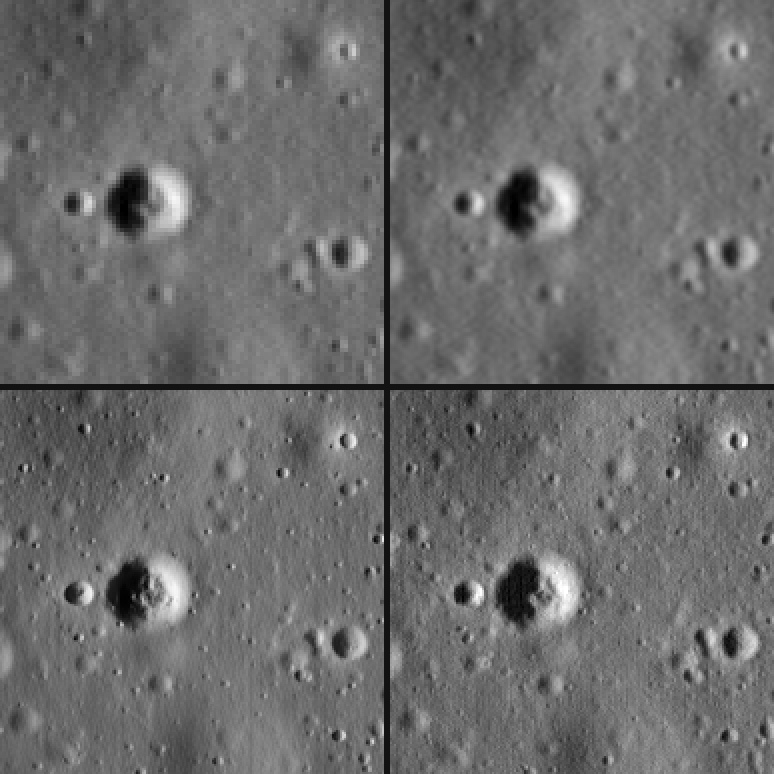
Top: the picture sent, its pixels repeated, and a plain enlargement. Bottom: Enhance, and the real picture. All four are magnified twice. The craters come back with the rims, shadows and shapes the real picture has. You might notice some remaining vertical lines and if you look really closely a few imagined boulders and pits/ditches which are due to the remaining sensor line error and echo.
Boulders: real, but redrawn
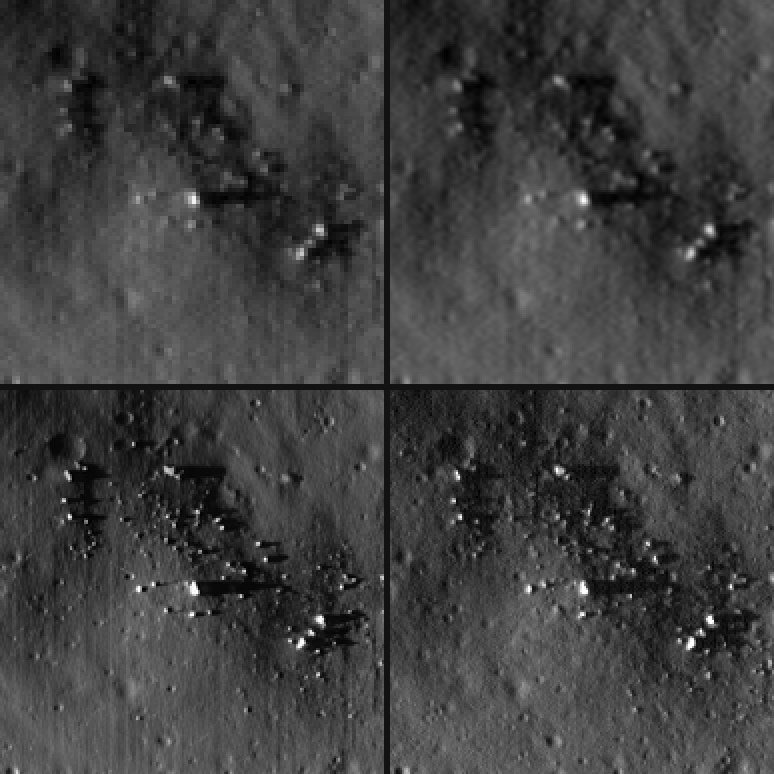
The same four, on a crater wall. Enhance finds the boulders but draws fewer, larger ones with long, clean shadows, where the real picture has many small ones with broken shadows.
We also checked it against a count made by hand. Watkins and colleagues mapped 1,793 boulders in the Apollo 17 crop, on the image our finer picture is cut from. Enhance makes the boulders the coarse picture holds easier to see, but more analysis is required to say for sure that it helps to automatically detect these features.
Where it draws more than is there
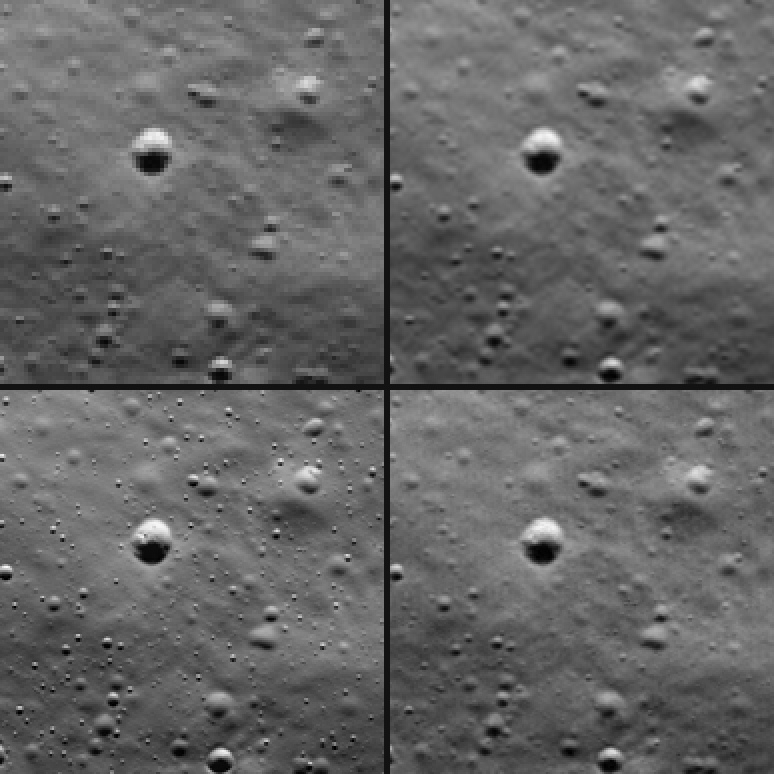
Near Chandrayaan-3, at 1.9 m per pixel, the finer picture adds little and a plain enlargement is already close to it. Enhance scatters small, sharp pits across the plain that the real picture doesn’t have.
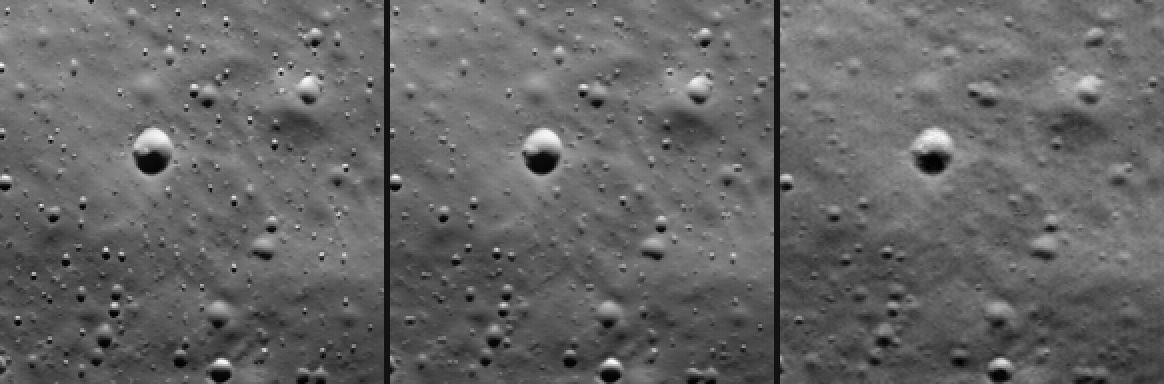
The same plain through the camera’s two circuits (see How these images were made): Enhance on the odd columns alone, the odd and even results averaged, and the finer picture. One circuit alone draws fewer false pits than the two interlaced circuits, but we lose half the information. Averaging the enhancement of the circuits also destroys some of the higher spatial frequencies. How to keep what both circuits genuinely saw is the question left open at the end.
What it’s good for
An enhanced lunar image seems useful for visual analysis, but more work is needed to prove its impact on automated analysis.
- Seeing and showing. Craters come back with the rims, shadows and shapes of the real picture, for context images, figures and outreach.
- Spotting. Boulder fields and fresh craters stand out, and what stands out most is real: at Apollo 17, 99% of the 250 boulders Enhance showed most strongly are in the finer picture too. It is a quick way to see where a closer look is worth it.
- Low sun. With the Sun 81–82° from overhead, Enhance picked out more of the hand-counted boulders than a plain enlargement; at 44–58°, fewer. Long shadows are what it sharpens.
How these images were made
The LROC Narrow Angle Camera reads its even and odd columns through two separate circuits, and that shapes everything below.
The echo. Each pixel’s signal reappears, at about a third of its strength, in the next pixel the same circuit reads: two columns over, or one in an image summed two to one across the track. It falls toward lower column numbers in NAC-R images and higher ones in NAC-L, and the archive’s calibrated images still carry it. Left in, Enhance sharpens each faint copy into a pit of its own. We undid it on the calibrated image before cropping:
def remove_echo(cdr, camera, summed, delta=0.326):
    # cdr: whole lines of a calibrated NAC image, every
    # column, in the archive's order
    k = 1 if summed else 2
    # NAC-R reads out from the other edge
    x = cdr[:, ::-1] if camera == "R" else cdr
    u = x.astype(np.float64)  # a copy
    for i in range(k, u.shape[1]):
        u[:, i] -= delta * u[:, i - k]
    u *= 1 + delta  # a flat scene keeps its level
    return u[:, ::-1] if camera == "R" else u
camera is the second-to-last letter of the product ID, L or R; summed is true for an
image 2,532 columns wide rather than 5,064. Correct whole lines, since each pixel’s correction
depends on the pixels before it. On these images it matches the USGS ISIS tool lronacecho to
within an eighth of the noise level, and it raises the noise by 30–50%, most of it at the finest
scales across the track.
The two circuits. An echo-corrected image still interleaves two circuits, each with its own
noise, and enhanced whole it comes back with faint vertical stripes in deep shadow. Each
circuit’s columns can instead be enhanced as an image of their own and the two results
averaged, for a second job. That removes the stripes and fades much of what Enhance invents,
along with real detail only one of them drew. On full-resolution images the whole image came
out closer to the real picture at five of seven sites, so every result on this page is the
whole image, one job at scale: 2. On summed images, where the whole image draws the most that
isn’t there, the averaged circuits were closer at four of five.
A circuit’s pixels are twice as wide as they are tall, so at scale: 4 its columns come back at
2× across the track and 4× along it; halve them along the track and shift them one pixel onto
the whole image’s grid:
def halve_lines(a, lobes=3):
    # halve along the track (axis 0) with a Lanczos filter
    o = np.arange(1 - 2 * lobes, 1 + 2 * lobes)
    t = (o - 0.5) / 2
    w = np.sinc(t) * np.sinc(t / lobes)
    w /= w.sum()
    n, pad = a.shape[0] // 2, 2 * lobes
    p = np.pad(a, [(pad, pad), (0, 0)], "reflect")
    return sum(c * p[pad + k:][:2 * n:2] for k, c in zip(o, w))


def enhance_field(u16, first=0):
    # one circuit's columns (first=0: even), back on the
    # whole image's 2x grid; u16 has an even number of columns
    field = np.ascontiguousarray(u16[:, first::2])
    # 4x along the track and 2x across: halve along it
    y = halve_lines(enhance(field, scale=4))
    # field pixel j is column 2j + first
    cols = np.arange(y.shape[1]) + 1 - 2 * first
    return y[:, np.clip(cols, 0, y.shape[1] - 1)]
Average the two with (enhance_field(u16, 0) + enhance_field(u16, 1)) / 2. enhance is
below.
The comparison. Both pictures of each pair are from the same camera. The finer one is at least twice as fine in both directions — this camera’s pixels are often not square — and the Sun is within 5° in height and 10° in direction. Its echo was removed the same way, and it was warped onto exactly twice the coarse picture’s grid, which left 0.07–0.14 of a coarse pixel; the coarse picture, which is what Enhance was given, was never resampled. Each crop is about 1.5 km of ground near its lander; Surveyor 7’s is about a kilometre from it.
Sending planetary data
Send 16 bits, linearly stretched, and keep the stretch so you can undo it. pypng keeps all 16
bits both ways:
# pip install craterview pypng numpy
import io
import numpy as np
import png
from craterview import CraterView

cv = CraterView(api_key="cv_...")


def enhance(u16, scale=2):
    # one job: 16-bit greyscale in, floats from 0 to 1 out
    height, width = u16.shape
    sent = io.BytesIO()
    writer = png.Writer(width, height, greyscale=True,
                        bitdepth=16)
    writer.write(sent, u16)
    job = cv.run(sent.getvalue(), model="cv-enhance-v3",
                 scale=scale, output_format="png")
    w, h, rows, info = png.Reader(bytes=job.bytes()).asDirect()
    rgb = np.vstack([np.asarray(r, np.float64) for r in rows])
    rgb = rgb.reshape(h, w, info["planes"])[..., :3]
    return rgb.mean(axis=2) / (2 ** info["bitdepth"] - 1)


# `iof`: your region as floats (reflectance, radiance or counts)
lo, hi = np.nanpercentile(iof, [0.01, 99.99])
scaled = (np.nan_to_num(iof, nan=lo) - lo) / (hi - lo)
u16 = np.round(np.clip(scaled, 0, 1) * 65535).astype(np.uint16)

iof_2x = lo + enhance(u16) * (hi - lo)
- 16 bits keep every level. A calibrated crop holds about a thousand distinct levels, which 8 bits would merge about four to one. The result comes back at 16 bits, as RGB with three nearly equal channels; average them.
- Fill missing and saturated pixels before sending, and mask them again afterwards: the model draws around whatever number is there.
- The result lines up with a standard 2× resize to within a fraction of a pixel, so a map projection or camera model for the input applies to it once scaled by two.
- One job is one price. The region a job works on and the result it returns are both
limited, and both limits are on the model’s card in the app and in
GET /v1/models.
Still open: combining the two fields
Split by circuit, an image gives two independent pictures of the same ground, and how best to combine them is still open. The Chandrayaan-3 plain above shows why it matters: each circuit invents its own pits, and averaging the two cancels many of them, along with some real ones.
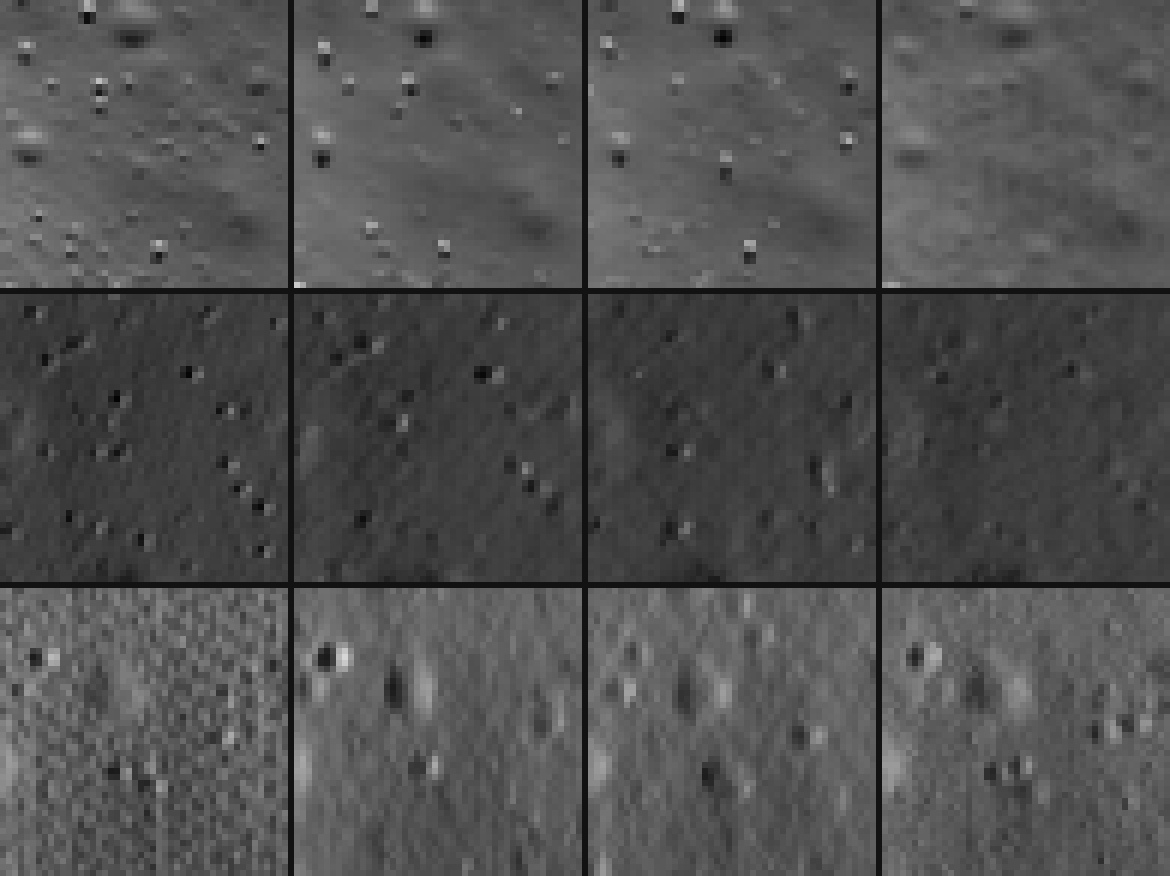
Chandrayaan-3, Surveyor 7 and Apollo 12, the echo removed, magnified six times. Left to right: Enhance on the whole image, on the even columns, on the odd columns, and the finer picture. Some of the small pits the whole image draws on this flat ground are in neither circuit’s result and not in the finer picture. Others, both circuits draw too.
- Averaging them gives a smoother picture, closer to the real one pixel for pixel than either field alone, but it fades everything only one field drew — invented pits, and real boulders too.
- Interlacing them, each column pair from the field that saw it, draws fine vertical stripes wherever the two disagree, and was further from the real picture pixel for pixel than averaging at every site.
- Keeping detail only where they agree came closest pixel for pixel, but lost much of the fine detail.
What we want is a combination that keeps whatever either field genuinely saw. That is the next experiment.
Take care when using enhanced images for counting boulders and ditches
- Keep the picture you sent beside the result, and mention that the result was enhanced.
- Check any potential feature that matters against the original or another picture of the same place.
- Treat boulder sizes, shadow lengths, etc. as potentially exaggerated in the enhanced result.
For the upload and polling under cv.run, see your first API call.
LROC images: NASA/GSFC/Arizona State University.
Try it on your own file
No signup and no card — a workspace opens for your browser the moment you do.
Open Web AppMore guides

