Restoring historical photos
Einstein in 1921, Tesla's laboratory, Apollo 11 — which of the two models to send an archival photograph to, the parameters that change the result, and what to check.
Two of the models take an old photograph, and they do different jobs. cv-restore-v1 repairs
a damaged print — tears, creases, scratches, dust and grain — corrects faded colour, and returns
a black-and-white photograph in colour unless told not to. cv-enhance-v3 enlarges a photograph
four times and rebuilds its fine detail, and leaves its colours alone. Every result on this page
was made through the public API with the parameters in its caption; drag a divider to compare,
and zoom to inspect.


cv-restore-v1, size: large.Which model, and when
| The photograph | Send it to | Because |
|---|---|---|
| Black and white or sepia, damaged or faded | cv-restore-v1 |
Repair and colour are one step. |
| In colour and intact, only small or soft | cv-enhance-v3 |
Restore would repaint the colours it already has. |
| A few hundred pixels across, and damaged or monochrome | cv-enhance-v3, then cv-restore-v1 |
Restore has more to work from. |
Restore
The call is one line with the Python client; the file goes up, the job runs, the result comes back in the format you sent, or in the one you ask for, wherever that format holds the picture.
from craterview import CraterView

cv = CraterView(api_key="cv_...")
job = cv.run("einstein-1921.webp", model="cv-restore-v1", size="large")
job.save("einstein-1921-restored.webp")
Mind the output size. size: standard, the default, returns about one megapixel at the
photograph’s own aspect ratio, whatever size was sent. A small scan comes back larger and a large
one comes back smaller: the 548 × 720 Einstein returns at 896 × 1168, and Tesla’s 1536 × 864
laboratory at 1360 × 768. size: large returns a 2048-pixel long side, refined at that size —
1552 × 2048 for Einstein — and took about three times as long here. Send a big scan with
size: large if its resolution is the point.


cv-restore-v1, default parameters.

cv-restore-v1, default parameters.The colour is inferred, not recovered
A black-and-white photograph holds no colour to restore; Restore draws a plausible one. It is usually right about wood, sky and wool and can be wrong about anything a viewer would need to know: a uniform, a flag, the colour of a car. It also redraws faces at the detail it outputs, and a face the original cannot resolve is drawn rather than read. At its defaults Einstein’s hair comes back grey; he was 42.
context is how you tell it what the photograph cannot show — up to 260 characters, followed as
an instruction. Below, left to right: the original, the default, context naming him, and
context describing him.
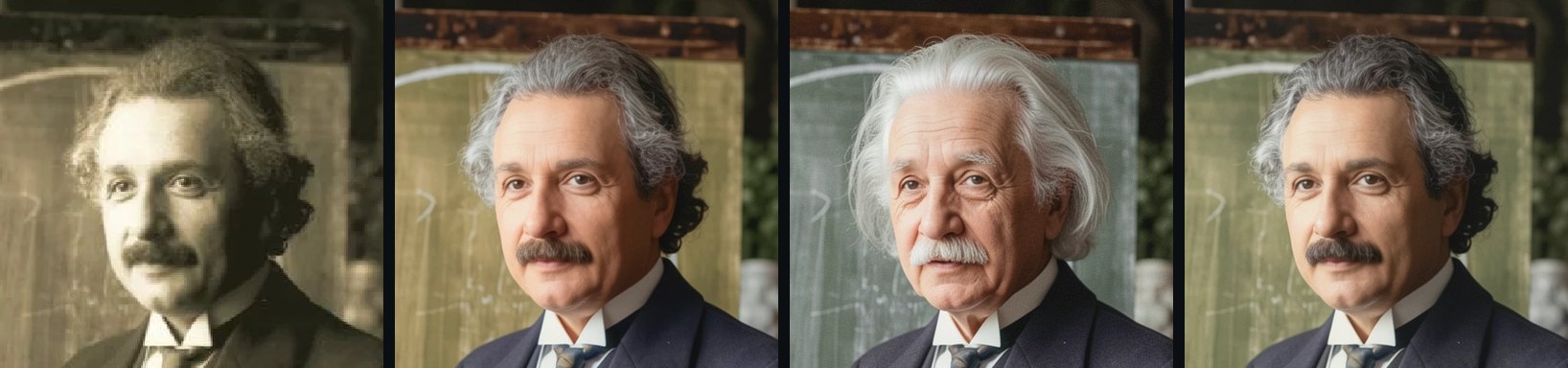
Naming him ("Albert Einstein giving a lecture in Vienna in 1921…") gave the Einstein everyone
knows — white-haired and thirty years older — not the one in this photograph. A famous name pulls
the result towards that person’s best-known pictures. Describing what is true of the picture
("A man in his early forties with dark, curly hair just beginning to grey, photographed in
1921.") moved it the right way. Write what you know about this photograph: ages, colours of
clothing, the place and the year.
Skin tone is the case where this matters most. Colourising a black-and-white photograph can
lighten darker skin; a sentence in context stating the subject’s skin tone corrects it.
When the colour is not yours to guess, don’t ask for it. monochrome: true returns the
photograph black and white, and the repair is more conservative.


monochrome: true: the repair, without the colour.Results are repeatable: the same seed and input give the same result, and a different seed
gives a different repair of the same photograph. The default is 42.
Very small originals: Enhance, then Restore
A scan a few hundred pixels across gives Restore little to repair from. Enhancing it first gives Restore four times the resolution to work at. The 301-pixel ship below went through both:
up = cv.run("ship.jpg", model="cv-enhance-v3")           # 4x by default
up.save("ship-4x.jpg")
job = cv.run("ship-4x.jpg", model="cv-restore-v1")
job.save("ship-restored.jpg")


cv-enhance-v3 at 4×, then cv-restore-v1 on its result.It is two jobs, so only chain them when the original is genuinely small: run on the 548-pixel Einstein, the chain gave a result almost indistinguishable from Restore alone.
Archival colour: Apollo 11
NASA’s Apollo photographs are colour scans, so they go to Enhance, which keeps every colour as it
is and rebuilds the detail a small scan lost. scale is 4 unless you ask for less, and roi
crops before anything else happens — as fractions of the image you send, origin top left — so a
detail of a large scan can be enlarged without enlarging the whole frame.
job = cv.run("as11-plaque.jpg", model="cv-enhance-v3",
             roi={"x": 0.1, "y": 0.15, "width": 0.75, "height": 0.75})


cv-enhance-v3, default parameters.

cv-enhance-v3, default parameters.Fine lettering is the thing to check. Where the original resolves the letters, they come back sharper; where it does not, the model draws letterforms that look right and may not be. The plaque’s text survives because the scan holds it; a sign photographed from across a street would not.
Before you publish one
- Keep the original, and say that a picture was restored, and that its colour is a rendering.
- Check faces against what is known of the person: age, hair, glasses, scars.
- Check colours that carry meaning: uniforms, insignia, flags, vehicles.
- Check any lettering you can read in the result against what you can read in the original.
Each result above is one job per model it went through — one for most, two for the ship — and a
model’s price is on its card in the app and in GET /v1/models. For the upload and polling
under cv.run, see
your first API call.
Try it on your own file
No signup and no card — a workspace opens for your browser the moment you do.
Open Web AppMore guides

