Denoise: AI photo denoiser for grainy, low-light shots
Take the grain out of a photo shot in low light or at a high ISO. Denoise cleans skin, cloth and walls and keeps colours, light and fine detail, at the photo's own size.
No sign-up and no card — a workspace opens in your browser the moment you arrive.
It is for the reception, the concert, the room with the lights down: photos where the grain is the problem and the size is not. Try it beside Enhance, which is the first tool to try even on a grainy photo; Denoise is for when you want only the noise gone.


What it does
A noise filter smooths the grain away and takes the fine things with it: skin goes waxy, lace goes flat. Denoise draws the picture again without the grain, so skin, shirts and walls come back clean, and lashes, lace and handwriting come back distinct. Because it draws the whole picture again, people come back as a close likeness rather than the same pixels.


Ways to run it
A part, or most of the frame
On a large photo, a window opens over the part Denoise works on at a time: a couple, a face, a table, or most of the frame. That part is worked at its own resolution and comes back at its own size. The larger the part, the longer the run.
Another drawing of the same photo
The seed setting picks one result out of the many Denoise could draw from the same photo. The same photo and seed always give the same result. Change it, run again, and compare.
Denoise, or Enhance with binning
Enhance’s binning also takes grain out, by averaging squares of pixels before it enlarges. Use Enhance with binning to make a noisy photo larger as well, or to take a whole large frame in one run. Use Denoise for the cleanest result at the photo’s own size, which it gives much better. Event photography compares the two on the same reception.
What to check
Denoise draws most freely where the photo holds the least, and that is where a viewer looks:
- Lines in faces. Forehead lines and the creases round an eye can come back deeper than the photo shows.
- Focus the lens didn’t give. Out-of-focus leaves come back with crisp edges, and a guest standing blurred behind the couple can come back as a sharp face. Check the background as closely as the faces you meant to show.
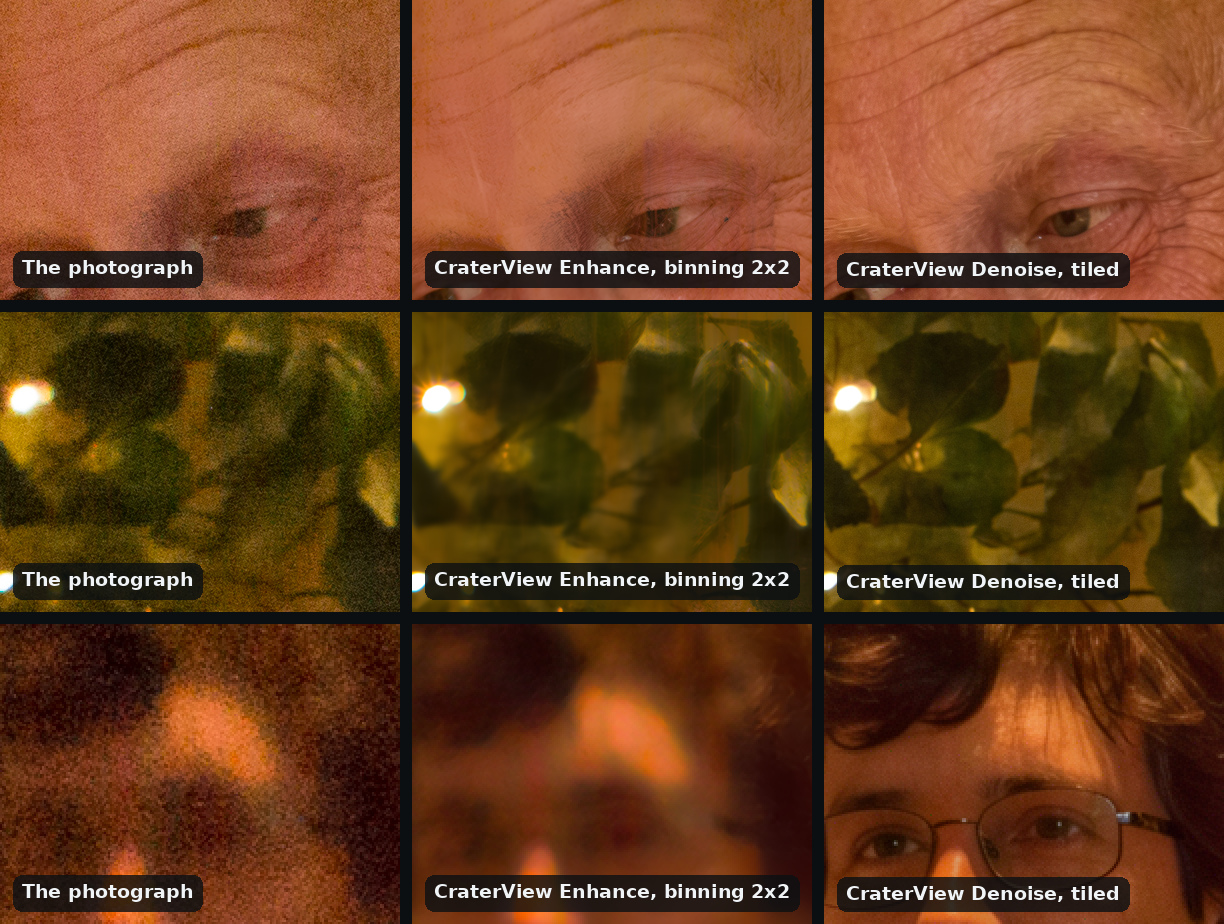
It doesn’t enlarge, and it has no strength to set. Compare every face with the original at full size before you deliver it, and keep the original beside the result.
From your own code
Denoise is on the HTTP API, with clients for Python and TypeScript. Below every run in the web app, Equivalent HTTP API calls shows the same request in curl, Python and TypeScript, ready to copy. Your first API call, in three requests walks through getting a key and the three requests a job takes.
Try it on your own file
No sign-up and no card — a workspace opens in your browser the moment you arrive.
Open Denoise in the web appGuides that use Denoise


