Enhance: AI photo enhancer and upscaler
Make a photo larger and sharper. Enhance enlarges a picture and rebuilds fine detail at the new size, and keeps its colours, bit depth and colour profile as they were.
No sign-up and no card — a workspace opens in your browser the moment you arrive.
Use it for a bigger print, a closer crop or a small, soft scan: at the new size it draws lashes, strands of hair, the weave of cloth and the lettering on a sign. It is the first tool to try on almost any photo you want improved, a grainy one included.


What it does
Choose how much larger with scale, or ask for an exact width or height in pixels, and the other side follows the photo’s proportions. Enhance doesn’t touch exposure, white balance or your grade: the colours and tones of the file you send are the ones you get back, at the bit depth you sent and in its colour profile. A 16-bit scan comes back 16-bit, and a Display P3 photo stays in Display P3.
Where the photo holds detail, Enhance draws it sharper at the new size. Writing is the best test, because you can check every letter:


Ways to run it
Frame the part that matters
On a large photo, a window opens over the part Enhance works on at a time. Drag it over the face, the sign or the certificate you need, and only that part is enlarged. A client who wants one face out of a wide shot of the whole class gets that face, larger:


An exact size for a print
A print needs pixels for its size: about 300 to the inch for a print held in the hand, and fewer for one on a wall. Ask for them with width or height rather than a scale, and the result is exactly that wide or tall. This wedding was shot on a six-megapixel camera in 2004 and enlarged for a 30-inch print:


Binning, for a grainy photo
Enhance reads everything in a photo as detail, grain included. For a noisy photo you are enlarging, set binning: it averages each square of 2x2, 3x3 or 4x4 pixels into one before enlarging, which takes the grain out and leaves less room to enlarge. Leave it off on a clean photo, where it only takes fine detail away. Enhance and binning shows each square side by side.


The file you get back
output format on auto returns the type of file you sent where it can, and otherwise a JPEG or a PNG. quality decides how much detail a JPEG or WebP result keeps. A raw file is not read: develop it and export a TIFF, which comes back as a PNG at the same bit depth. Bit depth, colour profiles and file formats says what each format holds.
What it can’t do
Where the subject itself is blurred, by motion or by missed focus, Enhance draws detail onto the blur rather than removing it. This graduate’s fist was moving, and in the photograph his class ring is a gold blur. Enhance draws a band of engraved lines on it, and they are not his ring’s crest:
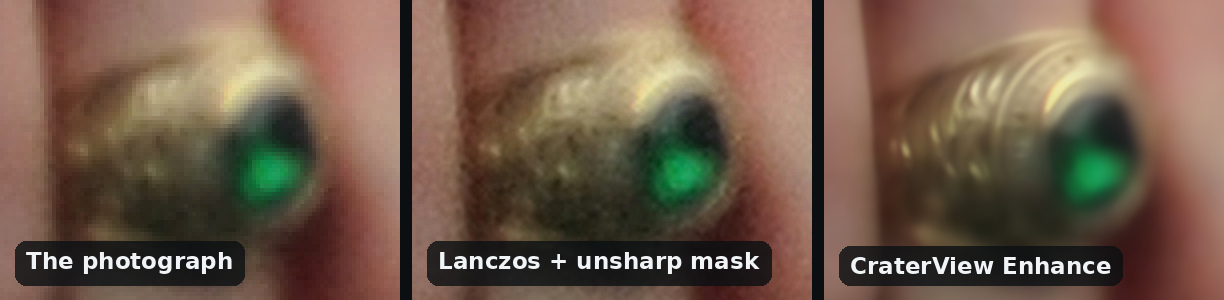
Check anything someone will recognize as theirs: a ring, a medal, a tattoo, lettering too small to read in the photo. Where the photo doesn’t resolve it, Enhance draws something that looks right and may not be. It also doesn’t:
- Retouch, or change exposure or colour. What you send is what you get, larger and with more detail.
- Keep wide-gamut colour. The most saturated colours an Adobe RGB or ProPhoto RGB file can hold come back clipped to the edge of sRGB; everything inside sRGB comes back where it was.
- Keep metadata. A result carries its colour profile and nothing else: no capture date, camera, caption or keywords.
Enhance and the other tools
- A grainy photo you want only cleaner, at its own size: try Denoise beside Enhance.
- An old print that is torn, creased or faded: Restore. For a very small one, enlarge it with Enhance first.
- Small faces that come out smeared after enlarging a group photo: Small face enhancement, after Enhance.
From your own code
Enhance is on the HTTP API, with clients for Python and TypeScript. Below every run in the web app, Equivalent HTTP API calls shows the same request in curl, Python and TypeScript, ready to copy. Your first API call, in three requests walks through getting a key and the three requests a job takes.
Try it on your own file
No sign-up and no card — a workspace opens in your browser the moment you arrive.
Open Enhance in the web appGuides that use Enhance


